Exporting
Beyond the IDE tool window, the Gradle plugin can render your navigation graph and your preview gallery to standalone files you can share in docs, pull requests, and design reviews. Each export comes in two flavors: an interactive HTML page and a static PNG. All of them are produced device free, so they don't need the IDE plugin or a connected device.
| Task | Output | Best for |
|---|---|---|
exportNavGraphHtml |
build/navgraph/nav-graph.html |
a self contained, interactive flow graph |
exportNavGraphImage |
build/navgraph/nav-graph.png |
a static snapshot for READMEs, PRs, slides |
exportPreviewGalleryHtml |
build/navgallery/preview-gallery.html |
a self contained gallery of every @Preview |
exportPreviewGalleryImage |
build/navgallery/preview-gallery.png |
a single contact sheet of every @Preview |
Generated on demand
Every export task depends on the same extraction pipeline as generateNavGraph (or generatePreviewGallery), so a single invocation extracts the graph, renders the thumbnails, and writes the export. You never need a separate generate run first. When cross module aggregation is on (the default), the export covers every dependency module's graph merged with this module's own, so exporting from :app captures the whole app.
See real generated output
Curious what these artifacts look like on real apps? The nav-results/ directory contains committed exports from real-world projects (the KotlinConf app, Now in Android, and SimpMusic): full navigation graph PNG exports under nav-results/nav-graphs/ and preview galleries under nav-results/preview-gallery/.
exportNavGraphHtml
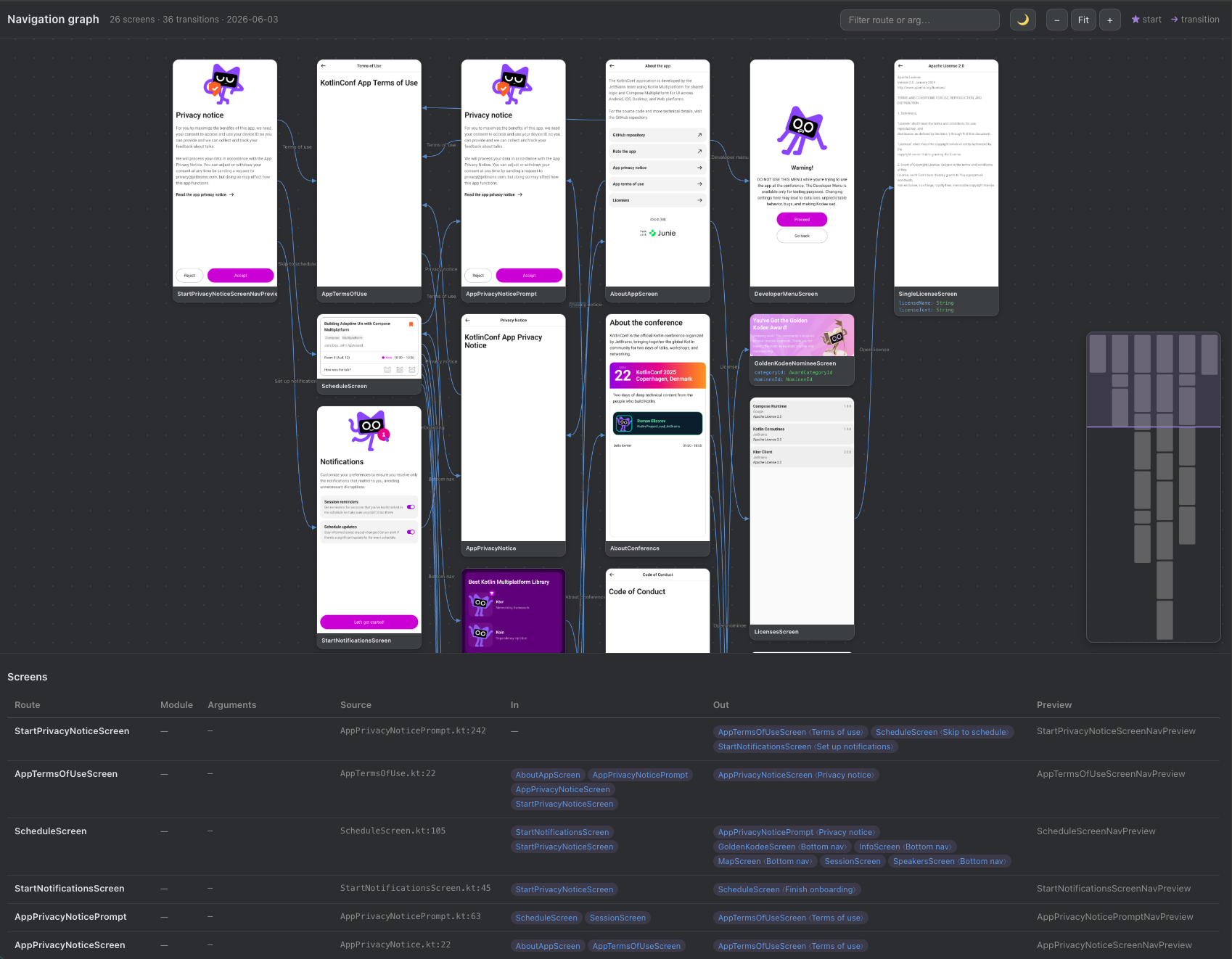
Renders a self contained, interactive flow graph as a single HTML file. Everything (layout, thumbnails, and interactivity) is inlined, so you can open the file directly in a browser or drop it into a static docs site with no server. The page lets you pan and zoom the flow map, filter by route and argument, and read a screens table listing every destination with its typed arguments, transitions, and source locations.
./gradlew :app:exportNavGraphHtml
The result is written to build/navgraph/nav-graph.html.
exportNavGraphImage
Renders a static image of the flow graph: a single PNG showing every node, its thumbnail, and the edges between screens. Ideal for embedding in a README or attaching to a pull request so reviewers can see the app's flow at a glance.
./gradlew :app:exportNavGraphImage
The result is written to build/navgraph/nav-graph.png.
Preview gallery exports
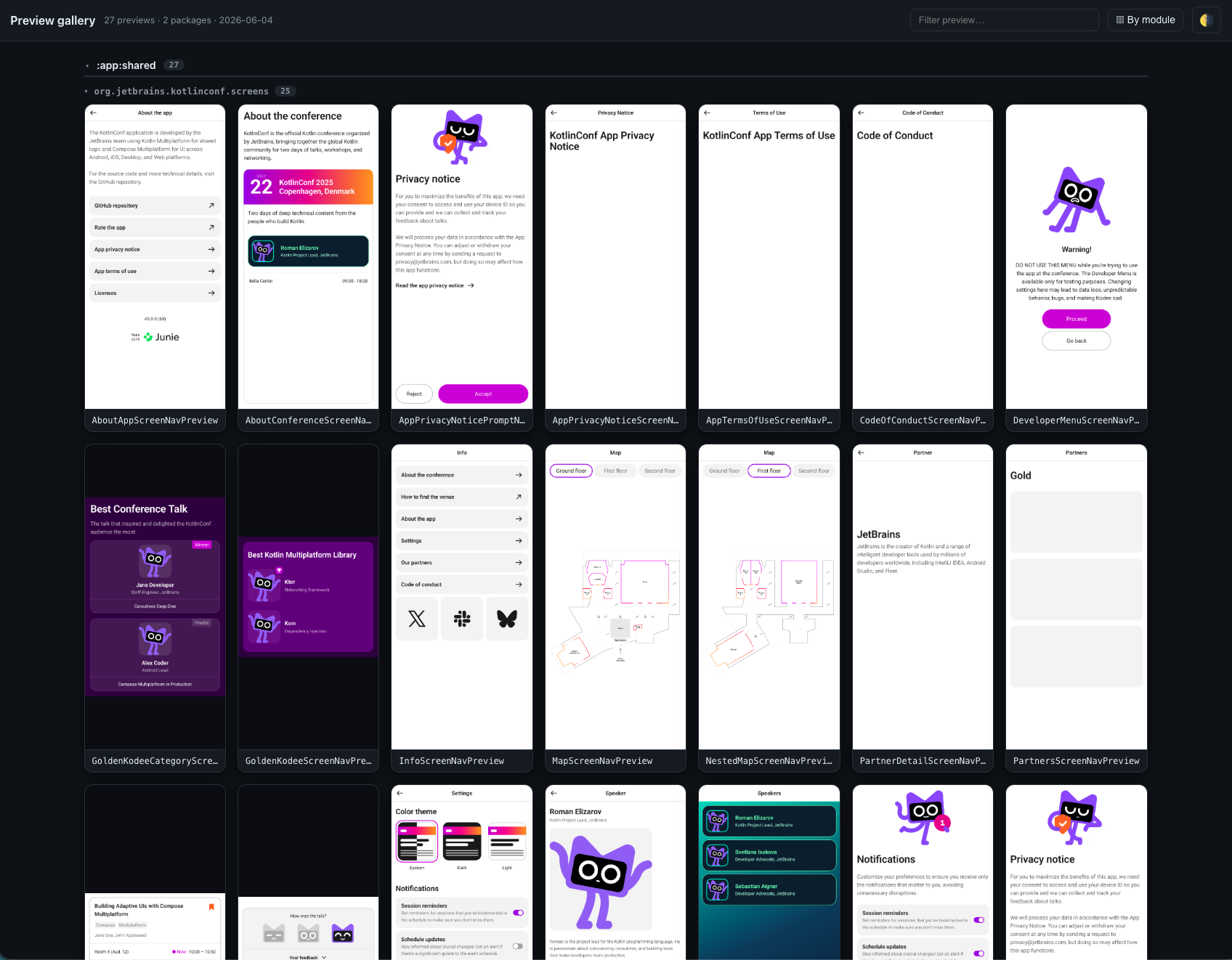
The same pipeline can render every @Preview in your project, not just the annotated screens, into a gallery grouped by module and package. Multipreview annotations are expanded and @PreviewParameter providers are honored. The generatePreviewGallery task renders the thumbnails into build/navgallery, and the two export tasks package them up:
./gradlew :app:generatePreviewGallery  # render every @Preview into build/navgallery
./gradlew :app:exportPreviewGalleryHtml  # build/navgallery/preview-gallery.html
./gradlew :app:exportPreviewGalleryImage  # build/navgallery/preview-gallery.png
The HTML gallery is a self contained page you can browse or publish as a living design system overview; the image export is the same grid as a single PNG contact sheet.
On demand only
The gallery tasks are registered when navgraph { galleryEnabled.set(true) } (the default) but are never wired into generateNavGraph or check, so they cost nothing unless you run them. See Configuration.
exportNavGraphMermaid
./gradlew :app:exportNavGraphMermaid # app/build/navgraph/nav-graph.mmd
The one export that needs no viewer. GitHub, GitLab, Obsidian, and most docs sites render a ```mermaid block
natively, so the graph can live in your README and be regenerated on every build instead of going stale as a
checked-in screenshot:
%% Generated by the navgraph 'exportNavGraphMermaid' task — do not edit by hand.
flowchart LR
  n0["HomeScreen"]
  n1["FeedScreen"]
  n2["SettingsScreen"]
  n0 -->|"open feed"| n1
  n0 -.-> n2
  classDef navgraphStart fill:#ede7f6,stroke:#6750a4,stroke-width:2px;
  class n0 navgraphStart
Declared transitions draw solid (-->), inferred ones dotted (-.->), and
the start destination gets its own class, so the flowchart carries the same distinctions the canvas does. Pass
-Pnavgraph.export.mermaid.markdown=true to get it wrapped in a fence, ready to paste or include.
exportNavDiffHtml / exportNavDiffImage
./gradlew :app:exportNavDiffImage  # app/build/navgraph/nav-diff.png
./gradlew :app:exportNavDiffHtml  # app/build/navgraph/nav-diff.html
The same two renderers, coloured against your committed .nav baseline: destinations and
transitions added in green, removed as a red dashed ghost that keeps the arguments it used to declare, and
changed (an argument or a label) in amber, with a legend and counts.
Because git already holds the baseline, "before" costs nothing, and the picture is computed from the exact lines
navCheck compares, so a pull request can never show a clean diff while the build fails on drift. Attach the PNG to
a PR and the reviewer sees what the change does to navigation in one image.
Export options
The export tasks accept a few -P Gradle properties to tweak the output without touching your build script:
| Property | Applies to | Effect |
|---|---|---|
navgraph.export.device |
exportNavGraphHtml, exportNavGraphImage, the diff exports |
Frames every thumbnail in a WxH device frame (letterboxed), e.g. 1080x2400. Blank (the default) keeps each node at its rendered aspect. |
navgraph.export.out |
exportNavGraphHtml, exportNavGraphImage |
Redirects the output file to the given path. |
navgraph.export.package |
exportNavGraphHtml, exportNavGraphImage, exportNavGraphMermaid |
Exports only the destinations under a package prefix (e.g. com.app.feature.feed), nested screens included, plus their internal edges. For single module apps organized by feature package. Blank (the default) exports the whole graph. |
navgraph.export.scale |
exportNavGraphImage, exportNavDiffImage, exportPreviewGalleryImage |
Supersampling factor for crisp hi-DPI PNGs (default 2, clamped to 1..8). |
navgraph.export.direction |
exportNavGraphMermaid |
Flowchart direction: LR (default), TB, RL, or BT. |
navgraph.export.mermaid.markdown |
exportNavGraphMermaid |
true wraps the output in a ```mermaid fence. |
navgraph.export.mermaid.out |
exportNavGraphMermaid |
Redirects the .mmd output to the given path. |
navgraph.diff.base |
exportNavDiffHtml, exportNavDiffImage |
Compares against a different .nav file (e.g. one restored from CI) instead of the committed baseline. |
navgraph.diff.html.out |
exportNavDiffHtml |
Redirects the diff HTML to the given path. |
navgraph.diff.image.out |
exportNavDiffImage |
Redirects the diff PNG to the given path. |
navgraph.gallery.out |
exportPreviewGalleryHtml, exportPreviewGalleryImage |
Redirects the gallery output file to the given path. |
For example, to export a hi-DPI PNG with phone framed thumbnails to a custom location:
./gradlew :app:exportNavGraphImage \
    -Pnavgraph.export.device=1080x2400 \
    -Pnavgraph.export.scale=3 \
    -Pnavgraph.export.out=docs/nav-graph.png
Scope the export to one feature
If your app keeps every screen in a single module and organizes them by feature package, you can export one feature's subgraph at a time with navgraph.export.package. It keeps the destinations whose route or screen lives under the given package (nested screens included) and drops any edge that crosses out of it:
./gradlew :app:exportNavGraphImage \
    -Pnavgraph.export.package=com.app.feature.feed \
    -Pnavgraph.export.out=docs/feed-graph.png
The IDE tool window exposes the same filter as a "Feature:" selector, so exporting from there passes this property for the feature you are currently viewing.
Embedding in Docs
Because the outputs are plain files, you can publish them however you like. For a static snapshot in your README:

For an interactive version, host nav-graph.html alongside your other docs (for example, copy it into your docs/ directory before building your site) and link to it.
For a graph that stays live in the README with no image to keep in sync, generate the Mermaid flowchart and paste it in. GitHub renders it natively:
```mermaid
flowchart LR
  n0["HomeScreen"]
  n1["FeedScreen"]
  n0 --> n1
```
Regenerate it in CI with ./gradlew :app:exportNavGraphMermaid -Pnavgraph.export.mermaid.markdown=true and write the result into the README.
Keep exports fresh in CI
If you commit a rendered graph image to your repo, regenerate it in CI on changes so it doesn't drift from the real navigation. For enforcing that navigation hasn't changed (rather than only publishing a picture), use the committed .nav baseline with navCheck instead.