Overview
🦉 Snitcher captures global crashes on Android, desktop, and iOS, and redirects to the exception tracing screen for swift recovery.
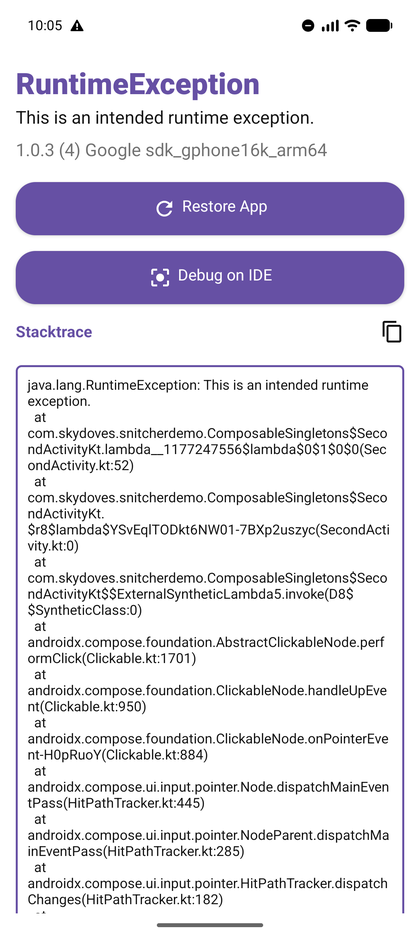
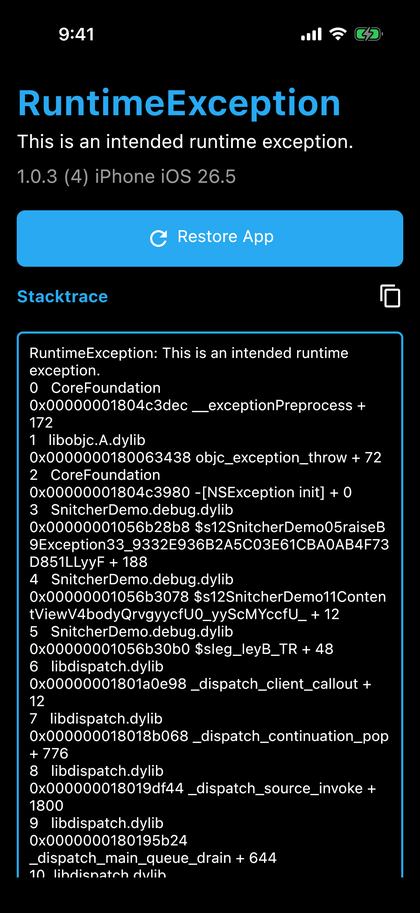
What is Snitcher?
Snitcher offers versatile advantages such as aiding in debugging crashes during development, facilitating easy sharing of exceptions by your QA team, enhancing user experiences with recovery screens instead of abrupt closures, and enabling global exception tracing and customized launch behaviors tailored to your specific needs.
The screens, the theme, and the captured model are shared across every platform with Compose Multiplatform, and each platform installs the crash capture that its runtime allows.
Download

Gradle
Add the dependency below to your module's build.gradle.kts file:
dependencies {
    implementation("com.github.skydoves:snitcher:1.1.0")
}
In a multiplatform module, add it to the source set that needs it:
kotlin {
  sourceSets {
    commonMain.dependencies {
      implementation("com.github.skydoves:snitcher:1.1.0")
    }
  }
}
What each platform can capture
| Android | Desktop (JVM) | iOS | |
|---|---|---|---|
| Uncaught JVM exceptions | yes | yes | not applicable |
| Unhandled Kotlin exceptions | yes | yes | yes |
Uncaught NSException |
not applicable | not applicable | yes |
| Unix signals, such as a Swift trap or a memory error | no | no | no |
| When the screen is shown | right after the crash, in a trace activity | right after the crash, in a window | on the next launch |
| Can restart the app | yes | no, the process keeps running | no, iOS does not let an app relaunch itself |
Snitcher never installs a signal handler. A crash that arrives as SIGSEGV, SIGABRT, or as a Swift runtime trap is out of reach for an in-process Kotlin handler, and belongs to a crash reporter such as KSCrash.