Non-Modal Bottom Sheet
Overview

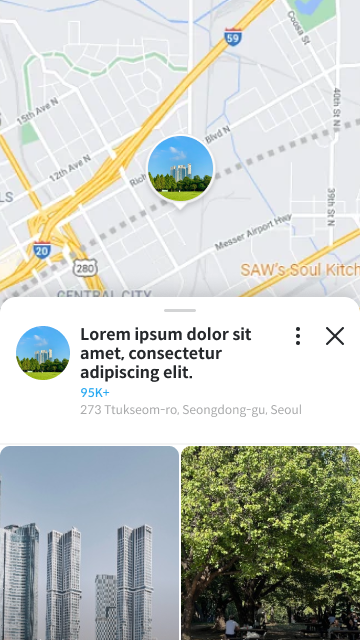

One of the key features of FlexibleBottomSheet is the ability to create non-modal bottom sheets. Unlike modal bottom sheets that block interaction with the content behind them, non-modal sheets allow users to interact with the underlying content while the sheet is displayed.
This is similar to how Google Maps displays its bottom sheet - you can still pan and interact with the map while the location details sheet is visible.
Basic Usage
To create a non-modal bottom sheet, set isModal to false:
FlexibleBottomSheet(
  onDismissRequest = onDismissRequest,
  sheetState = rememberFlexibleBottomSheetState(
    isModal = false,
    skipSlightlyExpanded = false,
  ),
) {
  // content
}

Key Differences from Modal
| Feature | Modal | Non-Modal |
|---|---|---|
| Scrim (dim overlay) | Yes | No |
| Touch passthrough | No | Yes |
| Blocks underlying content | Yes | No |
| Typical use case | Dialogs, selections | Maps, persistent panels |
Google Maps Style
A common pattern for non-modal sheets is the Google Maps style, where you have a map behind the sheet and can interact with both:
Box(modifier = Modifier.fillMaxSize()) {
  // Your map or main content
  MapView(
    modifier = Modifier.fillMaxSize()
  )

  // Non-modal bottom sheet
  FlexibleBottomSheet(
    onDismissRequest = { /* handle dismiss */ },
    sheetState = rememberFlexibleBottomSheetState(
      isModal = false,
      skipSlightlyExpanded = false,
      flexibleSheetSize = FlexibleSheetSize(
        fullyExpanded = 0.9f,
        intermediatelyExpanded = 0.5f,
        slightlyExpanded = 0.15f,
      ),
    ),
  ) {
    // Location details, search results, etc.
    LocationDetailsContent()
  }
}
Preventing Dismiss
For non-modal sheets that should always remain visible (like a persistent panel), you can set skipHiddenState to true:
FlexibleBottomSheet(
  onDismissRequest = { /* won't be called */ },
  sheetState = rememberFlexibleBottomSheetState(
    isModal = false,
    skipHiddenState = true,  // Sheet cannot be dismissed
    skipSlightlyExpanded = false,
  ),
) {
  // Persistent panel content
}
Combining with Initial Value
You can specify which state the non-modal sheet should start at:
FlexibleBottomSheet(
  onDismissRequest = onDismissRequest,
  sheetState = rememberFlexibleBottomSheetState(
    isModal = false,
    initialValue = FlexibleSheetValue.SlightlyExpanded,
    skipSlightlyExpanded = false,
  ),
) {
  // Sheet starts at slightly expanded state
}
Best Practice
For non-modal sheets, consider starting with SlightlyExpanded or IntermediatelyExpanded to give users immediate access to both the sheet content and the underlying content.